Free profit audit for Shopify
See where your store leaks profit. In about 30 seconds.
Auditink reads your products, policies, pricing, stock and the storefront your shoppers actually see, then gives you one clear report: a store health score, every finding in plain words, and what to fix first. Read-only. No setup. No card.
Installs from the official Shopify App Store. Nothing in your store is changed.
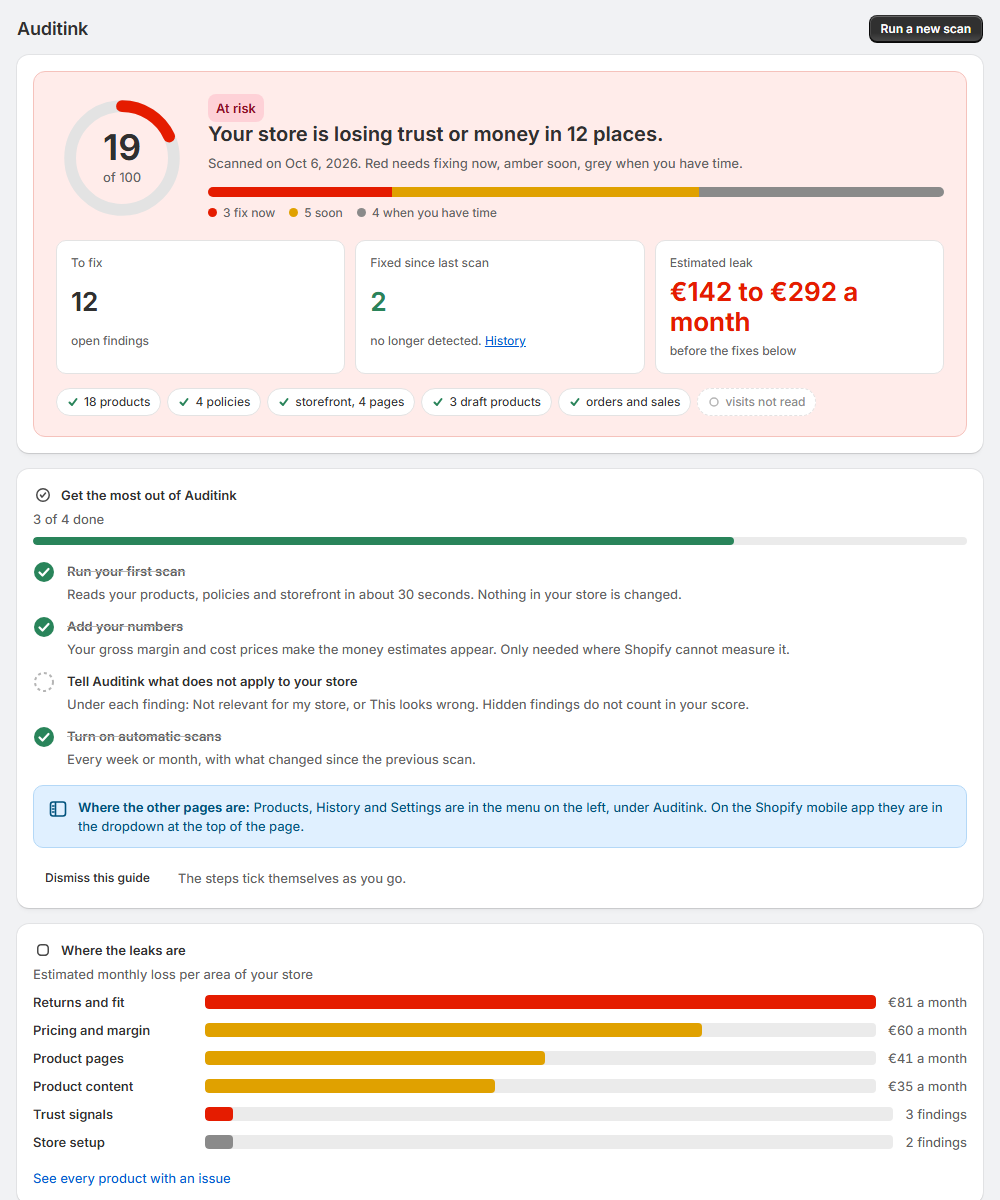
Your store is losing trust or money in 11 places.
Red needs fixing now, amber soon, grey when you have time.
3 fix now5 soon3 when you have time
Size or fit information is probably missing
Wrong size is the number one reason clothing comes back.
What to doAdd a size chart with real measurements, the model's height and size, and a short "choose this size if" tip.
Open in ShopifyWhere: Products
- Read-only access
- Audit in about 30 seconds
- Every finding free, no card
- On the Shopify App Store
How it works
Three clicks from install to a fix list
No spreadsheets to upload, no tracking code to paste. Auditink works with the data your store already has, and a short setup guide inside the app shows you the few things worth doing after the first scan.
Install from the App Store
One click in your Shopify admin. The app asks only for read access, so it can look but never touch.
Press Scan
Auditink reads your catalog, policies, discounts, stock, recent orders and your public storefront pages. It takes about half a minute.
Fix the top of the list
You get a store health score and the findings sorted by what to fix first. Each one says why it matters, what to do, and opens the product or setting straight in Shopify.
Inside your Shopify admin
Four pages. Plain words. Nothing to learn.
Auditink looks and works like the rest of your admin, so there is no new tool to get used to.
- Report. Your health score, where the leaks are by area of the store, the three findings to fix first, and the rest below.
- Products. Every product with an issue in one table: no photo, short description, marked down, draft with stock, no price, and more. Each row opens in Shopify.
- History. Your health over time, what got fixed since the previous scan and what is new. Automatic scans live here.
- Settings. Your numbers, the scan period, what Auditink reads, and the research behind every check.
What it checks
The leaks most stores never see on a dashboard
Your sales report shows what came in. It does not show the orders you lost to a missing return promise, the stock parked in a draft product, or the margin a blanket discount gave away. That is what Auditink looks for.
Margin Pricing and discounts
- Discounts deeper than your margin allows. Average discount measured against gross margin.
- Heavy markdowns. Products marked down 35% or more, with crossed-out prices that never applied.
- Free shipping threshold too low. Set so close to your average order that it rarely lifts basket size.
- Products with no price or no cost per item. Sold for free by mistake, or impossible to measure.
Returns Refunds and fit
- High return rate. Flagged once refunds pass the level where most operators start digging.
- Return signals in reviews. Phrases like "runs small" or "not as pictured".
- Missing size or fit guidance. Clothing and shoes with no size chart or fit notes.
Trust What shoppers actually see
- Return promise hidden. Only on a policy page, not near the buy button.
- No delivery time on the product page. Auditink reads your public storefront, so what your theme shows counts.
- No reviews where people decide.
- Template text left in your policies. Placeholders such as [INSERT COMPANY NAME], or an empty legal notice.
Catalog Product pages and stock
- Thin descriptions and missing photos.
- Broken characters from a bad import. Text like ë or — that every visitor sees.
- Draft products still holding stock, negative stock, and products in no collection.
- Medical claims in supplement copy that ad platforms and the law reject.
Read the full guide to all 12 leaks, and how to check them by hand →
Honest by design
No scare numbers. When the data can't back a figure, it says so.
Plenty of tools will tell you that you are "losing $50,000 a month". Auditink only shows a money estimate when your store's data can back it up. When it can't, the report says "Not enough data" and the findings still stand. And you decide what counts: a finding that does not apply to your store is hidden with one click and stops counting in your score. Every finding shows what Auditink saw, and the research behind the check.
Pricing
Start free. Upgrade only if the audit earns it.
The free plan shows every finding in full. Growth Monitor adds the money side and keeps watching your store for you.
Free
$0
Forever. No card required.
- Every finding in full: why it matters, what to do, where to fix it
- Store health score and the fix-first list
- 3 scans a month, first 50 products per scan
- Product issues export, read-only access
Growth Monitor
$19 / month
7-day free trial. Billed by Shopify, cancel anytime.
- Money estimate per leak, only when your data can back it
- Automatic weekly or monthly scans
- History: health over time, what got fixed, what is new
- Whole catalog, full product lists, all exports
Questions
Before you install
Is it safe to install?
Yes. Auditink only asks for read access. It never creates, edits or deletes anything in your store, and it stores no customer personal data. See the privacy policy for the details.
What do I get on the free plan?
Every finding in full: a store health score, the findings sorted by what to fix first, and for each one why it matters, what to do and where to fix it in Shopify. Three scans a month, the first 50 products per scan, and an export of product issues. Money estimates, automatic scans, history and the full exports are part of Growth Monitor.
What if a finding is wrong for my store?
Under every finding there are two buttons: "Not relevant for my store" hides it and it stops counting in your score, and "This looks wrong" hides it and sends us a short note so we can fix the check for every store. Hidden findings stay at the bottom of the report and can be shown again anytime.
Why does it say "Not enough data" instead of a money estimate?
Because guessing would be worse than saying nothing. If your products have no cost prices, or there are too few orders to measure, Auditink tells you so. Adding cost per item in Shopify, or your gross margin in the app's Settings, usually unlocks the estimates.
Does it read my storefront?
Yes. Besides your products, policies and orders, Auditink reads your public home page and a few product pages, the same way a shopper would. So the delivery time, return promise or reviews your theme already shows count in your favour. A password-protected store cannot be read, and the report says so.
Do I need to set anything up?
No. Install it and press Scan. Afterwards a short guide inside the app shows four optional steps: add your numbers, hide what does not apply, and turn on automatic scans. The steps tick themselves as you go.
How do I cancel Growth Monitor?
Downgrade from the plan section inside the app, or uninstall it from your Shopify admin. Billing runs through Shopify, so there is nothing else to cancel.
Find your first leak before lunch
Install Auditink, press Scan, and fix the top item on the list today. It costs nothing to look.